This tutorial will guide you on how to download and install
your Blackberry Bold 9700 themes.
6. Wait for the file to be imported.
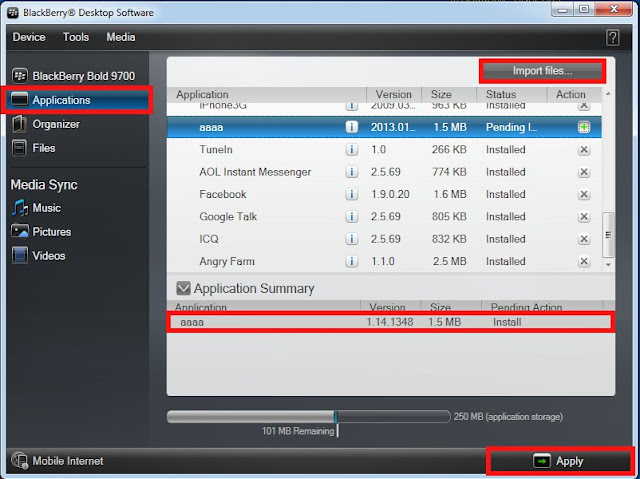 8. Click on the Apply button to complete the installation.
Before you proceed to the instructions, you will need the
following
1. Your Blackberry Bold 9700 smartphone
2. USB connector
3. Blackberry Desktop Manager
4. Winrar (extractor)
4. Winrar (extractor)
5. Downloaded theme (extracted)
INSTRUCTIONS
DOWNLOAD
1 1. Download the latest Blackberry Desktop Manager
on blackberry website and install it.
2. Then go to this website and browse for your
theme.
3. You have to select your theme you want to
download.
4. Click on the download links.
5. After downloading, look through to your download
folder, usually in My Documents>Download
6. The file type is in .rar, you have to extract it
(you can use winrar or winzip). Two files are included in
the folder (.alx and .cod).
the folder (.alx and .cod).
APPLY ON YOUR PC
1. Connect your Blackberry Bold 9700 to your
computer via USB connector.
2. Start the BlackBerry Desktop Software
3. Go to the Applications menu (wait for the list of applications to load)
4. Click the Import files button.
5. Browse your extracted downloaded file and choose .ALX file, click Open.
7. Your theme will now be displayed under Application Summary and the
Pending Action will show Install
9. Wait for the installation to complete and your BlackBerry to reboot.
10. Disconnect the phone from the PC.
APPLY ON YOUR PHONE
1. Open your Blackberry
phone
2. Go to
Menu>Options>Theme
3. Select the newly
installed theme from the list


